| |

|
I'm going to read back a bit and answer what I can! 1. How do I get rid of the brown bar where the navbar used to be if I've moved it? To do this, use this code: .gameheader div {
background: transparent !important;
border: none !important;
transition: 0.5s !important;
} What this does is it forces the inline elements (inline means inside the HTML, so for example <div style="border:1px solid blue"> is a div with the inline style of a blue border) to be changed so it no longer appears. That's what the !important means! NOTE: only use the important tag if you absolutely need it. It makes your code hard to read and can sometimes make adding new code harder. 2. New stable tabs?? I see some cool ones but don't know how to make them! If you want some fancy stable tabs, experiment! Nothing is stopping you from screwing with RGBA codes (red, green, blue, alpha), gradients, transitions, and anything else. You can use border radiuses to make some super cool effects, and messing with images is a very fun way to make your palettes unique. If you have other questions post here or PM me and I'm happy to answer! |
|
|
| |

|
How do I get the header background to "fade-in"? |
|  |
|
| |
|
Mythological said:
How do I get the header background to "fade-in"?
Fading in uses keyframe animations, which are complicated to initially learn but easy once you get the hang of it. @keyframes headerFade { 0% {opacity:0;} 100% {opacity:1;} } The purple text is the name of your animation, and can be anything you want. I always type mine in lower camel case (no spaces or punctuation, first word is left lowercase, all others are capitalized, like eBay) just because it makes my code neater, but you can do anything you want for naming. The red text is the percent of the animation. 0% for example is the very beginning of the animation (the first "frame", and 100% is the very end. You can use any other percentage point as long as they're in numerical order (50%, 33% wont work for example). The green text is the styles you want applied to whatever element you have the animation applied to, and can be any style. If you can apply it to anything else it can be used in an animation. animation: headerFade ease 1s 1; Above is what you would paste to make the fade animation apply to whatever element you want. The name is as I said before, the "1s" is how long you want the animation to take to play completely (go from 0% to 100%, here it lasts 1 second), and the 1 is how many times you want the animation to play. "Ease" tells the page that the animation should fade in, not just pop into existence. You can read more on W3schools. |
|
|
| |
|
Thank you <3
The Unknown said:
Mythological said:
How do I get the header background to "fade-in"?
Fading in uses keyframe animations, which are complicated to initially learn but easy once you get the hang of it. @keyframes headerFade { 0% {opacity:0;} 100% {opacity:1;} } The purple text is the name of your animation, and can be anything you want. I always type mine in lower camel case (no spaces or punctuation, first word is left lowercase, all others are capitalized, like eBay) just because it makes my code neater, but you can do anything you want for naming. The red text is the percent of the animation. 0% for example is the very beginning of the animation (the first "frame", and 100% is the very end. You can use any other percentage point as long as they're in numerical order (50%, 33% wont work for example). The green text is the styles you want applied to whatever element you have the animation applied to, and can be any style. If you can apply it to anything else it can be used in an animation. animation: headerFade 1s 1; Above is what you would paste to make the fade animation apply to whatever element you want. The name is as I said before, the "1s" is how long you want the animation to take to play completely (go from 0% to 100%, here it lasts 1 second), and the 1 is how many times you want the animation to play. You can read more on W3schools.
|
| |
|
| |
|
I seem to not be able to get it to work. I don't know what I am doing wrong. |
| |
|
| |
|
Mythological said:
I seem to not be able to get it to work. I don't know what I am doing wrong.
Does adding it to the .gameheader work (not the first child selector)? Animations can be finicky with specifics haha |
|
|
| |
|
Oh nope it's my bad actually! animation: headerFade ease 1s 1; That should work. I forgot to define how it fades haha |
|
|
| |

|
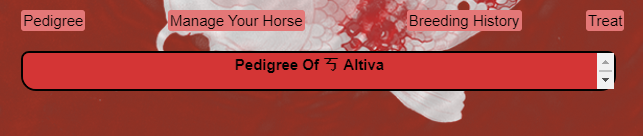 I'm having an issue with viewing pedigrees after making a custom palette. I have no idea how this happened lol I was wondering if anyone might know what happened here...I think it has to do with: div.secondaryBut I'm not sure why it's so tiny? |
|
|
| |
|
Notice! I will be rewriting this guide starting today. It'll be edited in parts, and I'll likely add new posts and pin them instead of making a whole new thread. Anything appearing above the dividing line is updated and can be followed with no worries. The line will look like this:
Anything below that line is not updated yet and is part of the old guide. If you want to be updated when the update is finished just click "subscribe to OP" on the front page! |
|
|
| |

|
I'm currently trying to figure out how to change the font of 'stable info/Home of.../about this stable' And I've managed to figure out what part of the css is goes with but for some reason every time I change the font is just changes the table font. No matter what kind div I put it with. If anyones willing to help that would be great! Thought this thread might be the best place to ask :) |
|  |
|

 Sunny
Sunny


